GPS Tracker Plus: Locate Track
- 3.6
- Rating
- 50.00K
- Installs
- Free
- Price

 Analysis by App-foxy
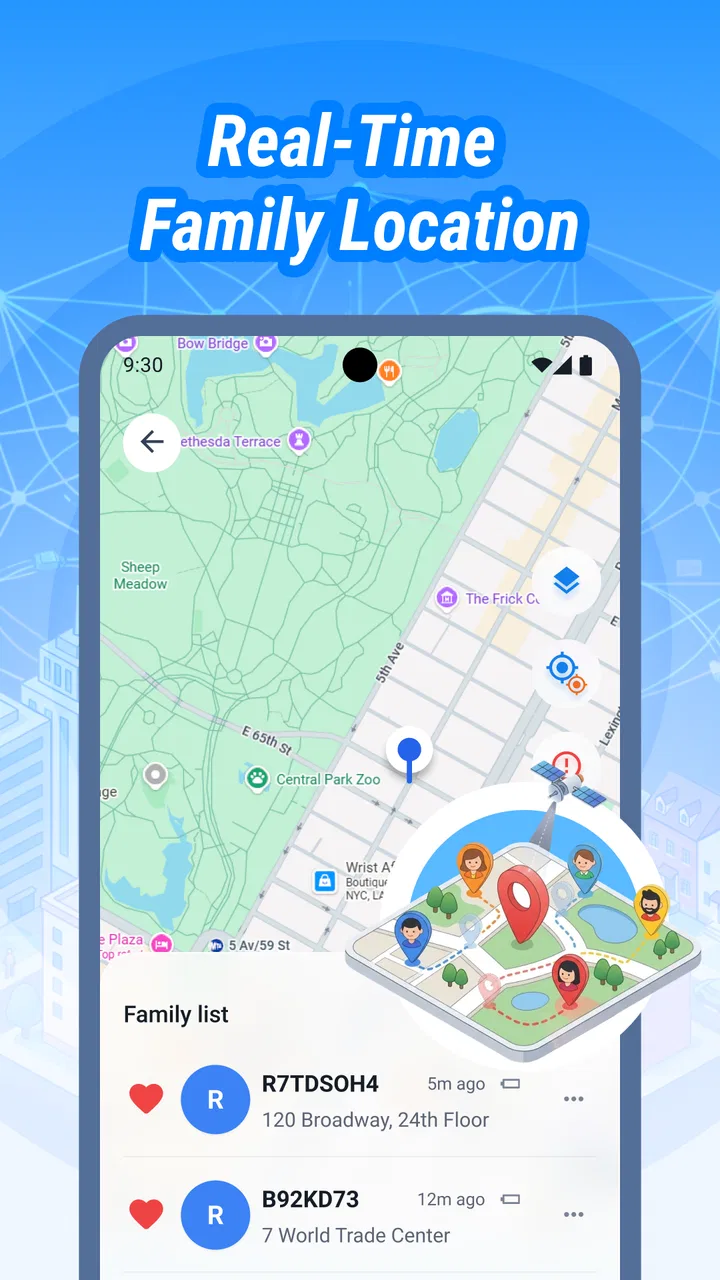
I tested GPS Tracker Plus: Locate Track as a lightweight location-sharing tool rather than treating it like a complete navigation suite. That distinction matters. Its place is in the Maps & Navigation category, and its main appeal is simple: helping people share where they are in real time. For a household, a couple of friends, or a small group coordinating movement, that focused purpose can be useful. It is less convincing if you expect turn-by-turn guidance, a polished family dashboard, or the broad travel features found in larger mapping apps.
The app is free, carries an Everyone age rating, and comes from Trung Kien CN Company Limited. It runs on Android devices using version 8.0 or later, so it can suit older phones that may not support every newer navigation application. The current release is 1.0.0.3, and the project is still relatively modest in public reach, with more than 50 thousand installs. I also noticed that its average score sits at 3.6 from roughly 51 ratings, which suggests a mixed early impression rather than a universally smooth experience.
How GPS Tracker Plus fits into everyday shared use
I find shared location most useful when it answers one practical question without turning into a constant check-in: where are we in relation to the place we agreed to meet? For a first try, I’d pick an ordinary, low-pressure outing and make sure everyone knows who is sharing and why. That gives the group a chance to see whether the app suits its routine before relying on it for plans that matter more.
You May Also Like

 Blood Strike: 2.5 Anniversary
Blood Strike’s Loadouts Turn Every Drop Into a Tactical Gamble
A close look at Blood Strike’s custom loadouts: how fast access to signature weapons reshapes its battle royale rhythm, rewards preparation, and narrows the gap between fights.

 Pandora - Music & Podcasts
Pandora’s Music Is Easy to Start, but Harder to Recover
Pandora’s strength is its low-effort path from a seed to a station. Its weak spot is how much confidence it asks you to place in connection, setup, and quiet recovery.

 8 Ball Pool
 Is Built on Rivalries, Rematches, and Routine
A close look at the rivalries, rematches, shared routines, and unanswered safety questions that turn a quick pool match into a persistent mobile community.

 Samsung Music
’s Quiet Strength Is Playing What You Already Own
Its reach comes less from spectacle than from dependable access to a personal library. That simplicity is both the app’s strongest retention engine and its ceiling.

 AccuWeather: Weather Radar
AccuWeather Review: A Quick, Clear Forecast for Everyday Decisions
For everyday plans, the best forecast is the one you can understand quickly. AccuWeather makes rain timing, radar, and local conditions easy to act on, with a few trade-offs.

 Hill Climb Racing
Why Hill Climb Racing Still Turns Crashes Into One More Run
A tiny car, a bumpy hill and one more upgrade: Hill Climb Racing keeps resurfacing because its simple chaos makes every near-miss feel personal.
More From Our News Desk
View All News


A practical scenario for a household
Imagine a household where one person is travelling home after work, another is waiting at a meeting point, and a third is out running an errand. Instead of sending repeated messages such as “Where are you now?”, the group can use a real-time location-sharing app to make coordination more direct. That is the kind of situation where this app makes sense: not as a replacement for a full map, but as a shared reference during a short period when several people need to stay aware of one another’s positions.
I find this especially useful when plans are moving quickly. A parent collecting someone from a busy area, roommates meeting before an event, or friends trying to regroup after leaving a venue can all benefit from seeing location information rather than guessing from vague landmarks. The value is not dramatic automation; it is the reduction of small, repetitive conversations.
There is also a useful distinction between temporary coordination and permanent monitoring. I would use the app for a journey, a meetup, or a day when people are travelling separately. I would not treat a location-sharing tool as an automatic substitute for conversation or consent. A shared map can show where a device is, but it cannot explain why someone stopped, whether their battery is low, or whether the displayed position is still current.
That last point is important in real life. GPS-based location can be affected by buildings, underground areas, poor reception, device settings, or a phone being left behind. I would always combine the app with an agreed check-in plan for situations where timing matters. If someone is expected at a particular place, a short message remains more dependable than assuming the map tells the whole story.
What it is, and what it is not
The name may lead some people to expect a broad tracking platform, but the confirmed focus is real-time location sharing. I would therefore approach it as a focused utility. It is not the first app I would open for discovering restaurants, planning a multi-stop road trip, checking public transport, or navigating unfamiliar streets. Those tasks are usually better handled by a mature mapping service with extensive place information and route planning.
Its narrower purpose can actually be an advantage for users who do not want a crowded interface. Someone who only needs to coordinate positions may prefer a dedicated tool over a large map application filled with search, reviews, traffic layers, saved places, and other options. The trade-off is that you may need to switch to another app whenever the conversation moves from “Where are you?” to “Which route should I take?”
In my view, the strongest use case is a small, clearly defined group with a shared plan. The weaker use case is anyone looking for a complete safety system, a professional fleet tracker, or detailed historical movement analysis. Those needs require more specialized tools and clearer controls than I would assume from this app’s simple positioning.
Setting it up without crossing personal boundaries
Before using any location-sharing application in a household, I would decide who needs to see whom and for how long. That conversation is more important than the installation itself. A shared device used by several people should not automatically become a window into everyone’s movements. Each person should understand what is being shared, with whom, and when the arrangement ends.
For a family, I would start with one specific scenario instead of enabling location sharing indefinitely. For example, agree to use it during a long journey or while meeting in an unfamiliar place. Once the activity is over, review whether everyone still needs access. This keeps the tool connected to a practical purpose rather than turning it into an unchecked habit.
On a shared phone or tablet, account boundaries deserve extra attention. I would avoid assuming that the person holding the device is the only person affected by its location. If several people use one device, confirm whose position is actually being represented before relying on the screen. A phone left in a car, at home, or in a workplace can create a misleading picture even when the app itself is functioning normally.
Another useful habit is to label the situation verbally when sharing begins: “I’m sharing my location for the trip to the station,” for example. That simple explanation creates a time and purpose boundary. It also makes it easier for children, older relatives, or less technical users to understand that location sharing is an active choice rather than an invisible background promise.
Coordination works best with a second channel
GPS Tracker Plus can help people see positions, but location alone is not a complete coordination message. I would pair it with ordinary calls or messages for decisions such as changing the meeting point, reporting a delay, or explaining an unexpected stop. This is one of the most practical ways to avoid overtrusting a map marker.
A good household workflow is simple. Agree on the destination, decide who is sharing, and choose a time to stop using the location view. If the group becomes separated, use the app to understand the general situation, then confirm the next action through a message. This avoids the common mistake of watching a moving marker without telling anyone what should happen next.
There is a subtle benefit here for shared errands. If one person is already at the destination while another is approaching, the waiting person can judge whether to remain at the entrance or move to a more visible place. That is more useful than sending a series of updates every few minutes. It also reduces the temptation to ask for exact street descriptions while someone is walking or driving.
At the same time, I would not use the app while driving. The person operating the vehicle should not be checking a live map, responding to messages, or adjusting sharing settings in motion. A passenger can handle coordination, or the driver can stop safely before interacting with the phone. The convenience of real-time visibility is never worth creating a distraction.
Age, trust, and the Everyone rating
The Everyone rating means the app is presented as suitable for a broad audience, but that does not remove the need for adult guidance around location privacy. A younger user may understand how to open a map without understanding the lasting implications of sharing a routine, a school route, or a home address. I would explain the purpose in plain language and make sure the child knows that they can ask questions about who can see the location.
For older relatives, the challenge may be different. They may appreciate a straightforward way to coordinate a pickup but feel uncomfortable with unfamiliar settings. I would set up the arrangement together, explain what the location view is meant to do, and establish a backup method such as a phone call. The app should make coordination easier, not become a test that the least technical person has to pass alone.
Trust also matters between adults. Location sharing can be helpful when everyone agrees to it, but it can feel intrusive when one person expects access without a clear reason. I would not recommend installing it on another person’s device without their knowledge, and I would not present it as proof of safety. A visible location does not reveal a person’s condition, intentions, or surroundings.
For teenagers, a negotiated arrangement is usually stronger than silent supervision. Agreeing on when location is shared, what happens if the phone loses signal, and when the arrangement ends gives the young person a clearer role. If the household needs more structured parental controls or detailed supervision options, I would look for a purpose-built family safety service rather than assuming this focused tracker provides them.
Where the app feels useful and where it feels limited
The most convincing quality here is focus. A real-time location-sharing app can solve a narrow but common problem without requiring every participant to learn a large navigation platform. If your group is already comfortable with basic map interactions, the concept is easy to understand: use the location view to coordinate, then return to normal communication once the activity is finished.
The limitations are equally important. A score of 3.6 from about 51 ratings indicates that the early user response is not uniformly positive. I would interpret that as a reason to test it with a low-stakes meetup before depending on it for an important journey. The app is free, which makes that trial easier, but free access does not guarantee the same polish, reliability, or depth as a long-established navigation service.
I would also keep expectations realistic around version maturity. Version 1.0.0.3 gives the product a relatively early feel, so I would not assume that every household workflow will be as refined as it is in services that have been evolving for years. That does not make it unusable; it simply means I would keep a backup plan and avoid making it the sole method for time-sensitive coordination.
Compared with a standard mapping app, this tool may be preferable when the only question is the current position of participating devices. A standard map is better for routes, places, traffic, and travel planning. Compared with a dedicated family safety product, this app may be simpler, but a specialized service is likely the better direction for families seeking extensive supervision, alerts, or structured household administration. I would choose based on the actual need rather than the word “tracker” in the name.
Small habits that make shared location more reliable
My first practical tip is to check the device before leaving, not after someone is already waiting. Make sure the intended phone is the one being carried and that the person sharing knows the arrangement is active. This catches the surprisingly ordinary problem of a family member taking a different handset from the one everyone expects to see.
Second, use the app for a defined activity. A trip to a meeting point, a shared outing, or a pickup window gives location sharing a clear beginning and end. This reduces confusion when several people have different routines and prevents an old sharing arrangement from being mistaken for a current one.
Third, treat a marker as an aid to conversation rather than a perfect measurement. If the displayed position seems inconsistent with what someone says, ask before drawing conclusions. The phone may be indoors, stationary in another place, or temporarily unable to update accurately. This is a particularly important rule when coordinating with children or older adults, because a mistaken assumption can create unnecessary worry.
Fourth, keep the backup plan visible. I would make sure every participant knows whom to call if the app is unavailable or the phone battery runs out. This is not a criticism unique to GPS Tracker Plus; it is a basic rule for any location-sharing service. The app can reduce uncertainty, but it should not remove ordinary preparation.
Finally, review the arrangement after the event. Ask whether the app actually helped, whether anyone found the sharing uncomfortable, and whether another tool would have been more suitable. That short review prevents a temporary convenience from becoming an unexplained household routine.
Who should try it, and who should choose something else
I would recommend trying GPS Tracker Plus to people who want a free, focused way to share live positions during everyday coordination. It is a sensible candidate for small groups, shared-device households, friends meeting in crowded places, and relatives who need occasional help finding one another. Its Android compatibility from version 8.0 onward also makes it worth considering when newer phones are not available.
I would be more cautious if your plans depend on highly reliable navigation, detailed route guidance, professional vehicle oversight, or formal family management. In those situations, a mainstream mapping app or a specialized safety and tracking service is likely to be a better fit. I would also skip it if the people involved are not comfortable agreeing on location boundaries. No convenience justifies turning a private device into an unwanted monitoring tool.
The app’s free price makes experimentation straightforward, and the Everyone rating keeps the intended audience broad. Still, I would begin with a simple test: two willing users, one ordinary trip, and a clear conversation about when sharing stops. If that experience feels understandable and dependable enough for your needs, the app may earn a place in your household’s coordination routine.
My household verdict
GPS Tracker Plus: Locate Track is best understood as a focused location-sharing utility, not an all-purpose map or a complete family safety platform. I like the directness of that role. When people are travelling separately or trying to meet, seeing a shared position can be more useful than exchanging constant updates. The app has a realistic place in a household, especially when everyone agrees on the purpose and uses it alongside normal communication.
My reservations come from the early-stage feel, the mixed average rating, and the natural limits of GPS-based coordination. I would not rely on it alone for an urgent situation, and I would not use it as a substitute for trust, consent, or a backup contact method. Those boundaries are essential, particularly when shared devices and younger users are involved.
Overall, I see it as worth trying for casual, consent-based coordination. It is most valuable when the problem is simply knowing where participating people are during a defined activity. If you need rich navigation, advanced household controls, or professional-grade tracking, choose a more specialized alternative. If you need a free and straightforward starting point for shared location, this app may be enough—provided you test it first and keep its role clearly defined.
FAQs for GPS Tracker Plus: Locate Track
01What features does GPS Tracker Plus: Locate Track offer?
GPS Tracker Plus: Locate Track offers real-time location tracking, geofencing, and location history. It allows users to set up safe zones and receive notifications when someone enters or leaves these areas. The app also provides detailed insights into travel paths and time spent at each location, making it ideal for both personal and business use.
02Is GPS Tracker Plus: Locate Track secure and private?
Yes, GPS Tracker Plus: Locate Track prioritizes user privacy and security. The app uses encryption to protect location data and allows users to control who can access their location information. It does not share data with third parties without explicit user consent, ensuring that your personal information remains confidential.
03Does GPS Tracker Plus: Locate Track work without an internet connection?
GPS Tracker Plus: Locate Track requires an internet connection to provide real-time updates and notifications. However, it can store location data offline and sync it once a connection is available. This ensures continuous tracking even in areas with poor network coverage, although real-time features may be temporarily unavailable.
04How does GPS Tracker Plus: Locate Track impact battery life?
GPS Tracker Plus: Locate Track is designed to be efficient, but like any GPS-based application, it can impact battery life. The app offers battery-saving modes and allows users to adjust update intervals to minimize power consumption. It's recommended to keep your device charged or use it with a portable battery for extended tracking periods.
05Is GPS Tracker Plus: Locate Track compatible with all devices?
GPS Tracker Plus: Locate Track is compatible with both Android and iOS devices. It supports a wide range of smartphones and tablets, but it’s advisable to check the app’s specific requirements on the app store to ensure compatibility with your device’s operating system version and hardware specifications.
Pros
- Accurate real-time location tracking.
- User-friendly interface and easy setup.
- Customizable alerts for safety zones.
- Battery-efficient tracking technology.
- Supports multiple devices per account.
Cons
- Limited offline functionality.
- Some features require a subscription.
- Occasional GPS signal drops.
- Interface lacks advanced customization.
- Ads present in free version.

GPS Tracker Plus: Locate Track
Gallery